Manual Simulink testing is slow and boring, so I built a GUI to automate it.
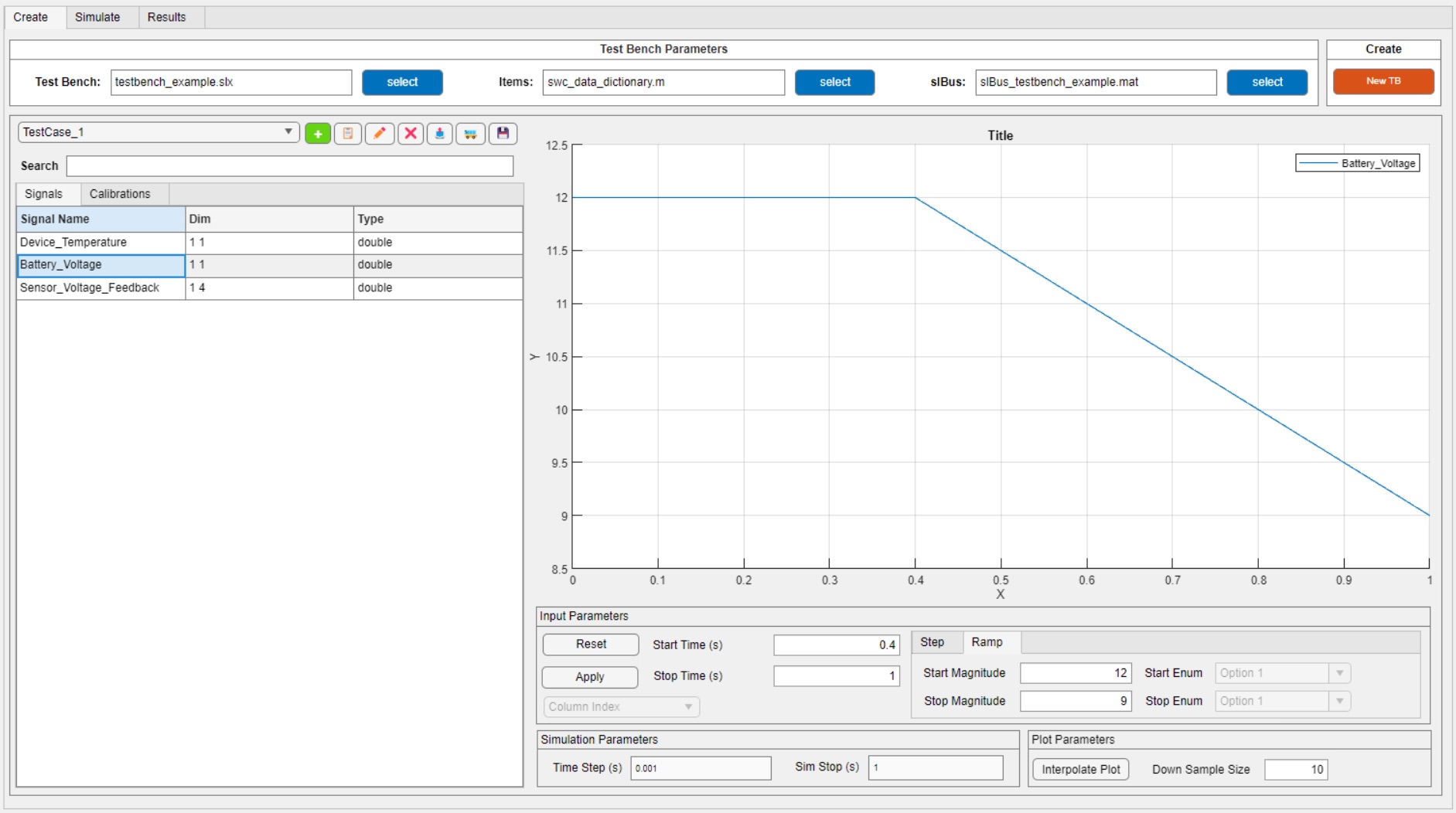
The MATLAB App Designer GUI.
Where did the idea come from?
The idea came to me when we were root causing a tough bug in one of our software components. I thought it would be useful to collect vehicle data with XCP/CANape and replay it back through the model. To do that, I needed a test harness, and I wanted to write one generic enough to work across any SWC.
So what does it actually do?
This tool offers a full testing environment for Simulink models. You can generate a test harness, build synthetic signals, modify calibrations, manage test cases, and run simulations all from one place. Here's a feature breakdown:
- Programmatically Generate Model Test Harness Point the GUI at any Simulink SWC and it automatically builds a test harness around it - wiring up all IO signals without any manual setup.
- Test Case Creation Create test case objects with configurable stop time and step size. Each test case object houses the synthetic signals you create for simulation inputs, customizable calibration data, and simulation output results. You can build new tests on top of existing tests to increase test coverage and reusability.
- Signal & Calibration Management Browse and search all IO signals and calibrations from your model in one place, with dimension and data type info at a glance.
- Input Shaping Define Step and Ramp inputs per signal with configurable magnitude, start time, and stop time - all from a clean interface.
- Programmatic Simulation Run simulations behind the scenes with full control over time step and duration. No need to manually interact with Simulink.
- Live Plot Output Visualize signal behavior directly in the GUI with configurable plot and downsample settings.
- Test Suite Storage & Loading Group multiple test case objects into a test suite that can be saved and loaded back in. Build up a library of tests over time and reload them instantly.
How much time does it actually save?
Quite a bit, honestly. Building a test harness by hand is tedious work - you're manually wiring up signals, configuring blocks, and hoping nothing breaks when the model changes. The GUI handles all of that automatically. What used to take a significant chunk of time is now done in seconds.
The ability to build tests on top of each other is another big one. Instead of recreating a test case from scratch every time, you start from something that already works and iterate. That alone changes how fast you can move through a test cycle.
And then there's the test suite workflow. Once you've built up a set of test cases, you can store them and load them back in at any time - results and all. You're not starting over every session. You pick up exactly where you left off.
What was the hardest part to build?
GUI architecture. I spent several weeks figuring out the best way to pass data between test objects and the GUI application - always keeping the user experience in mind.
Eventually I landed on a data structure that is modular enough to work across all of our different software components, but still structured enough to be pushed through all of the GUI features cleanly. That took a lot of iteration to get there.
Bonus annoyance: enumeration datatypes. They use characters to represent data, which made integrating them into the GUI a special kind of painful - error checking, dropdowns, table formatting, you name it. Every feature that touched an enum had to be handled separately. Not fun, but it's in there.
Did you use AI to build it?
Not really, and that's something I'm actually proud of. I built it before the AI boom, but it has seen several AI advancements in the recent year.
Who else uses it?
Me and one coworker. He's become the best kind of user -opinionated, vocal, and genuinely invested in it getting better. He gives feedback, I build the next thing, repeat. That loop has driven a lot of the tool's best improvements.
What would you add with unlimited time?
I would iron out a lot of the quirks with path dependency and persistency. I'd also write some documentation - a real guide for any engineer who picks up the tool at a later date.
Feature wise, I think it would be cool to have automatic pass/fail criteria for test cases that can generate test reports. And potentially leverage AI generated test cases on top of that.
Final thoughts?
GUIs make life easier - that's kind of the whole point. But there's something extra satisfying about building one that your coworkers actually reach for on their own. Build the tool you wish existed. Somebody has to.